Submitting a Watch Assignment
This assignment requires you to watch all slides and comments in a VoiceThread that your instructor has created.
Computer
- Sign in to your course.
- Click on the VoiceThread assignment link set up by your instructor.
- Click the yellow “Start Assignment” button on the right.
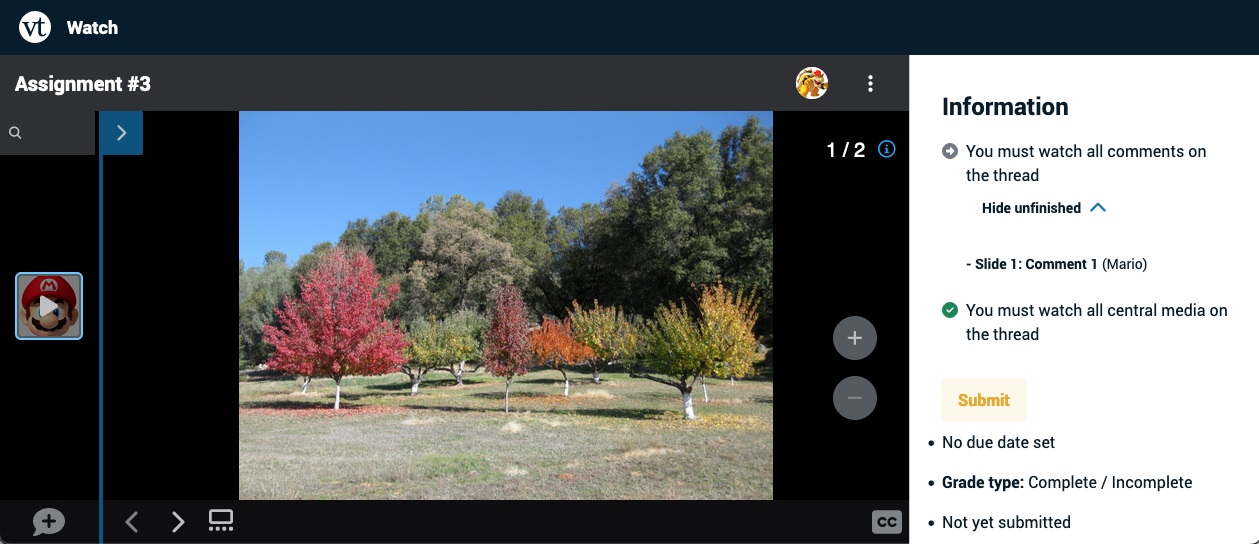
- Watch all slides and all comments in the VoiceThread from start to finish.
- Once you’ve watched all slides and comments, you’ll see a blue check mark next to the to-do list on the right. Click the yellow “Submit” button on the right to complete your assignment.
Errors
While assignments should work seamlessly most of the time, you might occasionally encounter an error message that you need help resolving. Some of the most common ones are detailed here.
This assignment is currently being edited by your instructor.
This means your instructor currently has the assignment in edit mode. You won’t be able to work on it until they publish the assignment again. Please reach out to them if you continue to see this message for a prolonged period.